
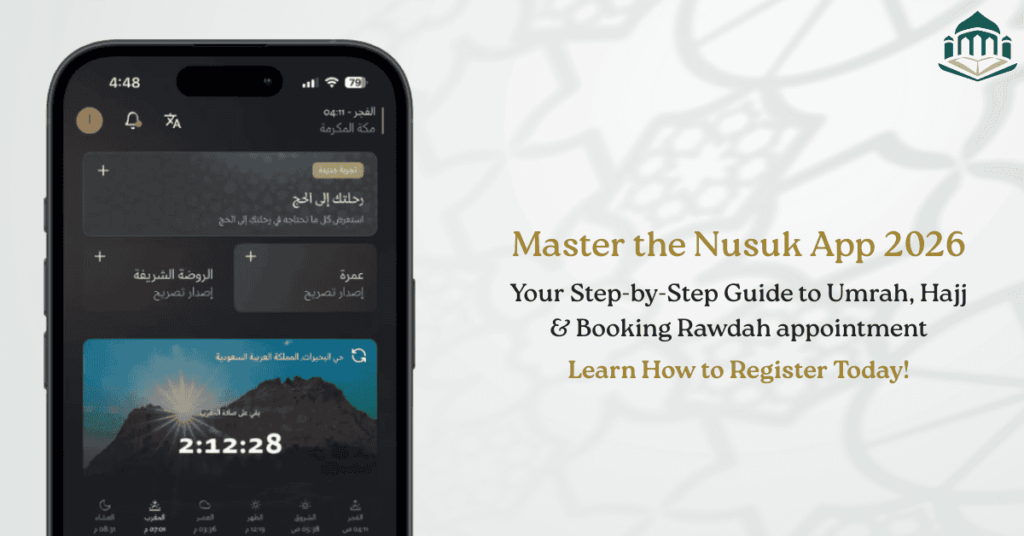
The Nusuk App (also referred to as the Nusuk application or Nusuk Umrah app) is the official digital platform introduced by the Saudi Ministry of Hajj and Umrah to manage Umrah, Rawdah (Riaz ul Jannah), and Hajj-related services. For Umrah 2026, the Nusuk app is no longer optional—it is mandatory for booking Umrah permits and Rawdah appointments.
If you are searching for how to use the Nusuk app, download Nusuk, or Nusuk app for Umrah, this guide explains everything step by step.
Official platform:
https://www.nusuk.sa/
What Is the Nusuk App?
The Nusuk app for visitors is a government-authorised mobile application that replaces older platforms such as Eatmarna for Umrah and Rawdah bookings.
It allows pilgrims to:
Book Nusuk Umrah permits
Reserve Nusuk Rawdah / Riaz ul Jannah slots
Register for Hajj (when enabled)
Manage payments and services digitally
The Nusuk application is available in English, Arabic, Urdu, and other major languages, making it accessible for international pilgrims.
Why the Nusuk App Is Mandatory for Umrah 2026
Saudi authorities now use the Nusuk app for:
Crowd control inside Haram
Health and identity verification
Slot-based entry management
Without a valid Nusuk Umrah permit, pilgrims may be denied entry into Masjid al-Haram, even if they hold a valid Umrah visa.
For visa-related requirements, read:
Umrah Visa Overview:
https://saudiumrahvisa.com/umrah-visa-overview/Umrah Visa Requirements:
https://saudiumrahvisa.com/umrah-visa-requirements/
Technical Requirements & Device Compatibility
Before proceeding with Nusuk app download, ensure your device meets the requirements.
Supported Devices
| Device | Minimum Requirement |
|---|---|
| Android | Android 8.0 or higher |
| iPhone | iOS 14 or higher |
Important Notes
Rooted phones may cause permit errors
Location services must remain enabled
Stable internet is required for QR verification
How to Download the Nusuk App (Official Methods)
Download Nusuk App – Android
Open Google Play Store
Search: Nusuk
Publisher: Ministry of Hajj and Umrah
Tap Install
This is the safest way for Nusuk app Android users.
Download Nusuk App – iPhone
Open Apple App Store
Search: Nusuk
Install and allow permissions
Nusuk APK / Nusuk App Download APK (Important Warning)
Many users search for:
Nusuk APK
Nusuk APK download
Nusuk app download APK
Official guidance:
The Saudi Ministry does not recommend using third-party APK files. APKs may:
Fail health sync
Break QR verification
Trigger account suspension
If Google Play is unavailable in your region, use the official Nusuk website:
https://www.nusuk.sa/
Step-by-Step Registration on the Nusuk Application
Step 1: Create an Account
Register using:
Passport number (recommended for visitors)
Visa details
Step 2: Verify Identity
Enter:
Passport details (must exactly match visa)
Nationality
Arrival date
Step 3: OTP Confirmation
Verify via SMS or email. International users should ensure roaming is enabled.
How to Book a Nusuk Umrah Permit
Booking a Nusuk Umrah permit is mandatory before performing Umrah.
Steps to Book Umrah Permit
Open the Nusuk app
Select Umrah Permit
Choose Masjid al-Haram
Select date and time slot
Confirm booking
A QR code will be generated. This QR code is scanned at Haram entry gates.
For a complete Umrah ritual guide, see:
https://saudiumrahvisa.com/how-to-perform-umrah-step-by-step/
Nusuk App for Rawdah (Riaz ul Jannah)
The Nusuk app for Riaz ul Jannah (also called Nusuk Rawdah) is the only official way to access Rawdah in Masjid an-Nabawi.
Key Rawdah Rules
Separate slots for men and women
Limited weekly availability
Strict time adherence
How to Book Rawdah Permit
Open Nusuk app
Select Rawdah Permit
Choose gender
Pick available slot
Confirm booking
This feature replaces older systems like Eatmarna app download APK, which is no longer active.
Nusuk App for Umrah Visitors from USA, UK, and Canada
The Nusuk app for visitors works globally, but international users should note:
| Country | Key Notes |
|---|---|
| USA | Some cards blocked for payments |
| UK | SMS OTP delays possible |
| Canada | Wallet refunds may take longer |
Visa-specific guidance:
Umrah Visa from USA:
https://saudiumrahvisa.com/umrah-visa-from-us/Umrah Visa from UK:
https://saudiumrahvisa.com/umrah-visa-from-uk/
Additional Services Available in Nusuk Apps
Besides Umrah and Rawdah, Nusuk apps offer:
Zam Zam water delivery
Hotel booking
Transport services
Mosque navigation
Emergency assistance
Ihram and essentials information
Travel preparation resources:
Umrah Travel Checklist:
https://saudiumrahvisa.com/umrah-travel-checklist/Ihram Rules:
https://saudiumrahvisa.com/ihram-rules-for-umrah/
Common Nusuk App Errors & Fixes (2026)
| Error | Reason | Solution |
|---|---|---|
| No permits available | Slots full | Check daily |
| Health not eligible | Tawakkalna not synced | Re-login |
| QR not loading | Network issue | Screenshot backup |
| OTP not received | Roaming off | Enable SMS roaming |
How to Use the Nusuk App for Umrah 2026 (India, UK, USA & Canada)
For pilgrims traveling from India, the UK, the USA, or Canada, the Nusuk app plays a critical role in connecting visa data, health status, and mosque entry permissions.
Nusuk App for Umrah Pilgrims from India
The Nusuk app for Indian pilgrims is fully supported and widely used, but there are a few India-specific considerations.
Key Points for Indian Users
Passport-based registration is mandatory
Visa details must exactly match passport spelling
OTP issues are common if international SMS is not enabled
Payments via Indian debit cards may fail
For visa guidance, refer to:
Umrah Visa from India:
https://saudiumrahvisa.com/umrah-visa-from-india/Umrah Visa Processing Time:
https://saudiumrahvisa.com/umrah-visa-processing-time/
Payment Tip (India)
Indian pilgrims are advised to:
Use international credit cards
Avoid RuPay-only cards
Not rely on UPI (not supported in Nusuk)
Nusuk App for Umrah Visitors from the UK
The Nusuk app for UK visitors is stable and performs well overall, but timing and SMS delivery need attention.
Important Notes for UK Pilgrims
SMS OTP delays are common due to roaming filters
Best time to book Rawdah: late night KSA time
UK-issued cards generally work for payments
Visa-related reading:
Umrah Visa from UK:
https://saudiumrahvisa.com/umrah-visa-from-uk/Umrah Visa Validity Rules:
https://saudiumrahvisa.com/umrah-visa-validity/
Practical Advice
UK pilgrims should:
Enable roaming before travel
Keep screenshots of Nusuk QR permits
Avoid VPN usage inside Saudi Arabia
Nusuk App for Umrah Pilgrims from the USA
The Nusuk app for USA pilgrims works reliably, but banking restrictions are the most common issue.
USA-Specific Considerations
Some US banks block Saudi transactions by default
OTP delivery usually works without delay
Health sync completes quickly if data is correct
Recommended reading:
Umrah Visa from USA:
https://saudiumrahvisa.com/umrah-visa-from-us/Saudi Entry Rules for Umrah:
https://saudiumrahvisa.com/saudi-entry-rules-for-umrah/
Payment Advice (USA)
Before travel:
Inform your bank about Saudi travel
Prefer Visa or Mastercard
Avoid prepaid cards for Nusuk wallet
Nusuk App for Umrah Visitors from Canada
The Nusuk app for Canadian pilgrims is fully functional, but refunds and wallet processing can take longer.
What Canadian Pilgrims Should Know
OTP delivery is generally reliable
Wallet refunds may take 10–14 business days
Card verification sometimes fails on first attempt
Useful preparation links:
Umrah Visa Requirements:
https://saudiumrahvisa.com/umrah-visa-requirements/Umrah Visa Insurance:
https://saudiumrahvisa.com/umrah-visa-insurance/
Comparison: Nusuk App Experience by Country
| Feature | India | UK | USA | Canada |
|---|---|---|---|---|
| OTP reliability | Medium | Medium | High | High |
| Card payment success | Low–Medium | High | Medium | Medium |
| Rawdah booking success | High (fast slots) | High | High | High |
| Refund speed | Slow | Medium | Medium | Slow |
Nusuk App Download (All Countries)
Official Download Options
Android (Recommended)
Google Play Store → Search Nusuk
Works for India, UK, USA, Canada
Best option for Nusuk app Android
iPhone
Apple App Store → Search Nusuk
Fully supported internationally
Official access: https://www.nusuk.sa/
Nusuk APK / Nusuk App Download APK – Country Warning
Many users from India and Canada search for:
Nusuk APK
Nusuk APK download
Nusuk app download APK
⚠️ Strong warning:
Using unofficial APK files may result in:
Permit rejection
Health sync failure
Account suspension
The Saudi Ministry does not support APK sideloading.
FAQs – Nusuk App 2026
Is the Nusuk app mandatory for Umrah 2026?
Yes. The Saudi Ministry requires all pilgrims to book Umrah permits via the Nusuk application. Entry to Haram without a Nusuk QR permit may be denied even if you hold a valid visa.
2. Can I perform Umrah without booking a Nusuk Umrah permit?
No. Security personnel at Masjid al-Haram scan QR codes generated by the Nusuk app. Without an active permit, access may be restricted.
3. Is the Nusuk app available in English?
Yes. The Nusuk app in English is fully functional and suitable for international pilgrims. Language can be changed in the settings menu after login.
Can I use Nusuk app outside Saudi Arabia?
Yes. You can register, update details, and monitor permit availability from outside Saudi Arabia. Some features activate only after arrival.
Is Nusuk APK safe to download?
No. The Saudi Ministry discourages downloading Nusuk APK files from third-party sites. Always use official app stores or nusuk.sa.
Does Nusuk replace Eatmarna app?
Yes. The Eatmarna app download APK is no longer valid. All Umrah and Rawdah bookings are now managed via Nusuk.
How often can I book Rawdah using Nusuk?
Rawdah bookings are limited per person and depend on availability. Slots are released periodically and fill quickly.
Can elderly pilgrims use one phone for Nusuk?
Yes. Multiple permits can be managed on one device, provided profiles are correctly added.
What if the Nusuk app crashes at the mosque?
Screenshots of valid QR codes are generally accepted, but live app access is recommended whenever possible.
Is the Nusuk app free?
Yes. The app itself is free to download. Charges apply only for optional services or packages.
Why do Indian cards often fail on Nusuk payments?
Many Indian banks restrict international merchant transactions by default. This is not a Nusuk error but a bank-side limitation. Using an international credit card usually resolves the issue.
Can UK and US pilgrims manage parents’ permits on one phone?
Yes. The Nusuk app allows multiple profiles to be added, which is especially useful for elderly pilgrims or family groups traveling together.
Is the Nusuk app mandatory for Umrah pilgrims from India, UK, USA, and Canada?
Yes. Regardless of nationality, all international pilgrims must use the Nusuk application to obtain Umrah and Rawdah permits. There are no country-based exemptions for 2026.